PulseShot
Mac screenshot, markup and screen recording app you mark up by talking
Part of the record stage.
Screenshots
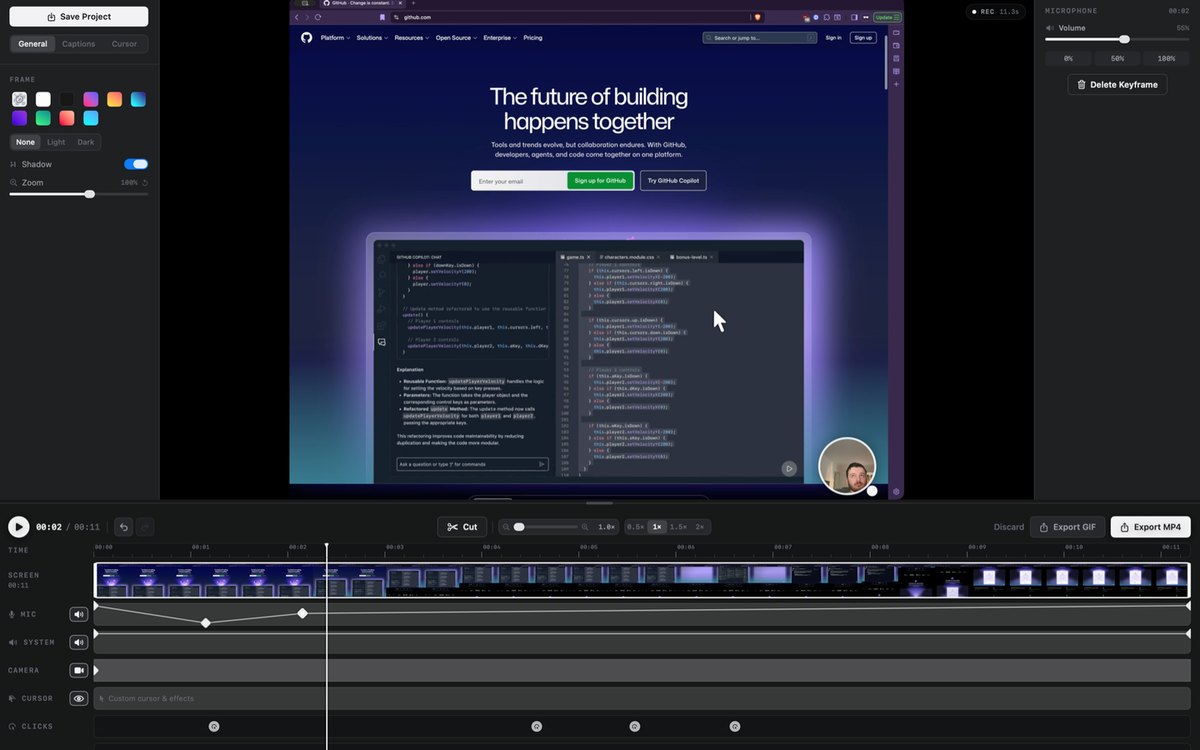
Supplied by PulseShot. We host our own copy.
What it does
PulseShot captures, marks up and records your Mac screen. Hold fn, circle anything and say what it needs, and PulseShot places editable arrows, boxes and labels, planned on your Mac. It includes 15 markup tools, Scan & Redact, a screen recorder with a timeline editor, and a searchable library. No account and no analytics in the app. Screenshots: area, window and full-screen capture, 15 markup tools, Scan & Redact with on-device OCR, Copy Text, re-editable projects. Recording: window, area or full screen with mic, system audio and camera; timeline editor with zoom, cursor, click, keystroke and caption lanes; MP4 and GIF export. AI features need Apple Silicon with Apple Intelligence or the free Gemma model. Requires macOS 15 or later. Free plan; Pro is a one-time $19 launch price (regular $29).